Many of us, searching for a software to be able to login multiple accounts in yahoo messenger. Sometimes we don't know if it is harmless or not to our PC. But worry not 'cause the one that I will teach you is not a software that you will install to your PC or laptop. So this is virus free.
You need to follow very well my instruction if you don't know much about editing Registry.
First, click on the Start Menu button look and click for the "run" command and type in there "regedit".
After that, It will pop-up to your screen the Registry editor box. (Just in case registry editor didn't appear in your screen, it may seem that your PC is infected with a virus.) We just need to locate the folder of the yahoo messenger.
Now, look for the "HKEY_CURRENT_USER" click on it (+) to expand the directory.
Look for the "Software folder" click on it(+)...
and then look for the "Yahoo folder" same thing what you did before, click on the plus (+) sign.
After that, look for the "pager" folder and then look again for the "Test" folder...
Right click on the "test" folder, on the drop down menu select NEW>DWORD VALUE
Rename it to "Plural" and double click on it then type 1 on the Value data and close the registry editor. Now you can log in multiple accounts in yahoo messenger!!!!
Open now your yahoo messenger and log in one of your account. After that open a new yahoo messenger and log in your other account. You can open your yahoo messenger simultaneously .
ENJOY!!!
Showing posts with label Tips and Tricks. Show all posts
Showing posts with label Tips and Tricks. Show all posts
Thursday, January 21, 2010


How to add background image to blogger header
So, you want to add an image or a picture to your blogger header to give a unique look to your blog.Adding image to header is not a complex one,it is very simple.
Before this,first take a backup of your blog template,so there is a chance to get back to your current template if you made any mistakes.
1.First sign in to your blogger account>Edit html
click the edit html and scroll down the template till you see the below one and note down the width(sothat, you will have an idea of which image dimensions best fits your blog)
note down the width In the above case, my template is minima and the width is 660 px.
2.If you have photoshop or any other tools,crop the picture corretly to 660 px(width).If you don't have photoshop,then you can crop a photo by this free online tool Click here.
3.So, your image is ready now! click the page elements tab again.
click on the page elements tab
Click on the edit button as shown below next to your blog name.
4.And you will go to a window just like the below one.First select,the option whether you want to place the image behind the title and description or insted of title and description.Next,browse for the image and save the changes after the image has uploaded.
5.That's it! Now, your blog has a background image in the header.
Have any questions?ask your question via comments.
from bloggertricks.com
Before this,first take a backup of your blog template,so there is a chance to get back to your current template if you made any mistakes.
1.First sign in to your blogger account>Edit html
click the edit html and scroll down the template till you see the below one and note down the width(sothat, you will have an idea of which image dimensions best fits your blog)
note down the width In the above case, my template is minima and the width is 660 px.
2.If you have photoshop or any other tools,crop the picture corretly to 660 px(width).If you don't have photoshop,then you can crop a photo by this free online tool Click here.
3.So, your image is ready now! click the page elements tab again.
click on the page elements tab
Click on the edit button as shown below next to your blog name.
4.And you will go to a window just like the below one.First select,the option whether you want to place the image behind the title and description or insted of title and description.Next,browse for the image and save the changes after the image has uploaded.
5.That's it! Now, your blog has a background image in the header.
Have any questions?ask your question via comments.
from bloggertricks.com
Submit blogger sitemap to yahoo to index your web pages
This post explains how to submit your blogger sitemap to Yahoo.By submitting your sitemap to yahoo, they will index your web pages in yahoo search engine and provide you with detailed information related to your blog like which pages are linking to yours,popular pages in your site and you can submit and track feeds for your sites.
Also,you have the choice to delete any urls of your blog if you won't want to index certain pages of your site.
Submitting your site to yahoo is easy and give your web pages more exposure.
All you need is a YAHOO ACCOUNT(ID).However,you don't need an yahoo ID to know the information like how many pages are indexed,etc.But,if your blog is a new one or no pages in your blog are indexed(type your blog url in yahoo search and see to check whether your web pages are indexed or not), then you want Yahoo id to submit your sites,feeds,etc.
Let't see how to make yahoo index your webpages by submitting your blog sitemap.
1.Go to Yahoo Site Explorer
2.Click on the 'Sign in' link which is at the top of the page,see the screenshot below(If you don't have a Yahoo id, you can get one here) and sign into your accoutnt.
click on the 'sign in link'
3.Type your blog url in the box provided as shown in the below screenshot.Don't forget to replace the 'yourblogurl' with the original url of your blog and click on the 'Add My Site'
4.After adding your site,you need to Authenticate(Verify your ownership).
There are two ways to verify your ownership.One is to upload a file to the root directory of your site which can't be possible in blogger.
Another one is to 'adding a metatag' which is possible and the only way to verify ownership for bloggers.First,copy the metatag..
Next,sign in to your blogger account>Edit html and paste the metatag below the head tag and SAVE THE CHANGES,look at the screenshot below.
Next,you will get a message saying that 'Your site is pending authentication'
Note:Don't remove the metatag,they will revalidate your ownership by checking your ownership regularly.
5.Next,go back to the 'Site explorer home', and check the box next to your blog url and click on the Manage button.
6.Type rss.xml or atom.xml in the box provided.It helps yahoo to discover more of your site content via your rss or atom feeds and to index your blog pages quickly whenever your blog is updated.Next,click on the add feed button.
That's it.Now,you have sucessfully submitted your blog sitemap to yahoo.Check your account after a couple of days and you will see your blog indexed in yahoo search engine.
Meanwhile,if you didn't submitted your blog sitemap to google,please read this about How to Submit your blog sitemap to Google
Also,you have the choice to delete any urls of your blog if you won't want to index certain pages of your site.
Submitting your site to yahoo is easy and give your web pages more exposure.
All you need is a YAHOO ACCOUNT(ID).However,you don't need an yahoo ID to know the information like how many pages are indexed,etc.But,if your blog is a new one or no pages in your blog are indexed(type your blog url in yahoo search and see to check whether your web pages are indexed or not), then you want Yahoo id to submit your sites,feeds,etc.
Let't see how to make yahoo index your webpages by submitting your blog sitemap.
1.Go to Yahoo Site Explorer
2.Click on the 'Sign in' link which is at the top of the page,see the screenshot below(If you don't have a Yahoo id, you can get one here) and sign into your accoutnt.
click on the 'sign in link'
3.Type your blog url in the box provided as shown in the below screenshot.Don't forget to replace the 'yourblogurl' with the original url of your blog and click on the 'Add My Site'
4.After adding your site,you need to Authenticate(Verify your ownership).
There are two ways to verify your ownership.One is to upload a file to the root directory of your site which can't be possible in blogger.
Another one is to 'adding a metatag' which is possible and the only way to verify ownership for bloggers.First,copy the metatag..
Next,sign in to your blogger account>Edit html and paste the metatag below the head tag and SAVE THE CHANGES,look at the screenshot below.
Next,you will get a message saying that 'Your site is pending authentication'
Note:Don't remove the metatag,they will revalidate your ownership by checking your ownership regularly.
5.Next,go back to the 'Site explorer home', and check the box next to your blog url and click on the Manage button.
6.Type rss.xml or atom.xml in the box provided.It helps yahoo to discover more of your site content via your rss or atom feeds and to index your blog pages quickly whenever your blog is updated.Next,click on the add feed button.
That's it.Now,you have sucessfully submitted your blog sitemap to yahoo.Check your account after a couple of days and you will see your blog indexed in yahoo search engine.
Meanwhile,if you didn't submitted your blog sitemap to google,please read this about How to Submit your blog sitemap to Google
how to submit blogger sitemap to google-useful tip for new bloggers
Before doing this,let me say what are sitemaps and how they will help us.The reason we use them is,they will help google bot to crawl,index pages of your site and tell you if there are any problems when they try to index it.It also helps you to know,how many pages exactly are indexed,and what people searched in the search engine to visit your site.
Let me explain the detailed procedure on how to submit your blogger sitemap to google.
1.First,go to google webmaster tools and sign in with your gmail account.
2.After you logged in, you will see this asking you to add a site.
google webmaster tools
Add your blog url(ex:kranthitips.blogspot.com).Don't add with http or www.
3.Next,it asks you to verify your site.It is just to confirm whether you are the owner or not.
CLICK on the 'verify your site' link.
click the 'verify your site' link
Next,
choose verification method
4.There are two ways to verify your ownership but, there is only one way for the blogger users to add a metatag.
copy the metatag
5.Copy the metatag.
Now,sign into your blogger account>click the layout button>Edit html and paste the metatag just after the head tag and save the changes.
paste the metatag like this
and click the verify button in the google webmaster tools and there will be a confirmation message saying that you have sucessfully verified.
conformation message
Now,you have to submit a sitemap for google to crawl your site.Go back to the google webmaster dashboard or (home) and click the 'Add' link which is next to your blog name and in the Sitemaps column.Then,you see this,
Choose 'Add general web sitemap' from the dropdown menu and type rss.xml or atom.xml next to your blog address as shown below
or
and click the 'Add General Web Sitemap' button.
6.That's it.Now your sitemap is successfully submitted to google.Check 2 or 3 days after and you will see the detailed statistics of your blog(indexed pages,any errors,etc.)
If you have any questions regarding this,you can ask here via your comments
Let me explain the detailed procedure on how to submit your blogger sitemap to google.
1.First,go to google webmaster tools and sign in with your gmail account.
2.After you logged in, you will see this asking you to add a site.
google webmaster tools
Add your blog url(ex:kranthitips.blogspot.com).Don't add with http or www.
3.Next,it asks you to verify your site.It is just to confirm whether you are the owner or not.
CLICK on the 'verify your site' link.
click the 'verify your site' link
Next,
choose verification method
4.There are two ways to verify your ownership but, there is only one way for the blogger users to add a metatag.
copy the metatag
5.Copy the metatag.
Now,sign into your blogger account>click the layout button>Edit html and paste the metatag just after the head tag and save the changes.
paste the metatag like this
and click the verify button in the google webmaster tools and there will be a confirmation message saying that you have sucessfully verified.
conformation message
Now,you have to submit a sitemap for google to crawl your site.Go back to the google webmaster dashboard or (home) and click the 'Add' link which is next to your blog name and in the Sitemaps column.Then,you see this,
Choose 'Add general web sitemap' from the dropdown menu and type rss.xml or atom.xml next to your blog address as shown below
or
and click the 'Add General Web Sitemap' button.
6.That's it.Now your sitemap is successfully submitted to google.Check 2 or 3 days after and you will see the detailed statistics of your blog(indexed pages,any errors,etc.)
If you have any questions regarding this,you can ask here via your comments
Useful Widgets,Add-Ons & Tools for Your Blog,Website
Adding Widgets, Add-Ons & tools to your blog is not just a lot of fun for your blog readers, but can also be very useful and help you to create a community for your blog or even a loyal reader base.
Here's a collection of best and most useful blog widgets or add-ons that can be easily integrated with any website/blog. All these below add-ons are 100% Free and they are very easy to install.
Outbrain Star Ratings Widget: Very eager to know what your readers think about your posts?
Here is a cool star rating widget by Outbrain. The insttallation is very simple,
just follow the step by step instructions on their site.
ShareThis or AddThis : Sharethis or Addthis social bookmarking Sharethis social bookmarking buttonbuttons makes it easy for your visitors to share your content with others. It is a good way to increase your link popularity and publicity. Their nice css dropdown icons reduces the clutter on your pages and eliminates the need to add a different button for each social bookmarking service.
whos.amung.us : This is a real time visitor tracking widget and displays online visitor tracking widget
the number of people currently on your site and what pages they are
reading. You don't need any sign-up's to grab this widget.
Web2PDF Online : With this widget installed, your visitors can easily downloadSave Page as PDF
your articles in PDF format with just a click. The downloaded PDF's are
free of any advertising and you can get full access to download stats,etc.
ZOHO Creator: With Zoho Creator, you can create professional onlinezoho creator
contact forms/web forums in minutes. The good things about this is
there are no data limits and readers can also upload attachments while
submitting the form.
Google Talk Badge: Google Talk Badge will let your visitors toGoogle talk badge
chat with you.The badge will active whenever you sign in to
Googletalk. The nice thing is your visitors can chat with you even
if they don't have a google account.
Yahoo Media Player: With this very useful widget, you canYahoo media player easily add a simple media player to your blog which can auto detect mp3 links and create an embedded player. This tool is very useful for especially audio,music blogs.
cbox
Cbox: Cbox or Chatbox is a chat widget which can be easily embedded
in any web page. It is free and have many features including message
history, spam blocking,etc. It can be easily customizable to fit your
blog layout.
Google Translate: This widget lets your non-English speakingGoogle translate widget
visitors to quickly translate your webpage in their native
language with just a single click.
from bloggertricks.com
Here's a collection of best and most useful blog widgets or add-ons that can be easily integrated with any website/blog. All these below add-ons are 100% Free and they are very easy to install.
Outbrain Star Ratings Widget: Very eager to know what your readers think about your posts?
Here is a cool star rating widget by Outbrain. The insttallation is very simple,
just follow the step by step instructions on their site.
ShareThis or AddThis : Sharethis or Addthis social bookmarking Sharethis social bookmarking buttonbuttons makes it easy for your visitors to share your content with others. It is a good way to increase your link popularity and publicity. Their nice css dropdown icons reduces the clutter on your pages and eliminates the need to add a different button for each social bookmarking service.
whos.amung.us : This is a real time visitor tracking widget and displays online visitor tracking widget
the number of people currently on your site and what pages they are
reading. You don't need any sign-up's to grab this widget.
Web2PDF Online : With this widget installed, your visitors can easily downloadSave Page as PDF
your articles in PDF format with just a click. The downloaded PDF's are
free of any advertising and you can get full access to download stats,etc.
ZOHO Creator: With Zoho Creator, you can create professional onlinezoho creator
contact forms/web forums in minutes. The good things about this is
there are no data limits and readers can also upload attachments while
submitting the form.
Google Talk Badge: Google Talk Badge will let your visitors toGoogle talk badge
chat with you.The badge will active whenever you sign in to
Googletalk. The nice thing is your visitors can chat with you even
if they don't have a google account.
Yahoo Media Player: With this very useful widget, you canYahoo media player easily add a simple media player to your blog which can auto detect mp3 links and create an embedded player. This tool is very useful for especially audio,music blogs.
cbox
Cbox: Cbox or Chatbox is a chat widget which can be easily embedded
in any web page. It is free and have many features including message
history, spam blocking,etc. It can be easily customizable to fit your
blog layout.
Google Translate: This widget lets your non-English speakingGoogle translate widget
visitors to quickly translate your webpage in their native
language with just a single click.
from bloggertricks.com
How to disable right click in blogger(blogspot) or any webpage
This post explains how to disable right click on blogger(blogspot) or any other webpage using a html(javascript) code.
It is so annoying if someone copies(thefts) your blog posts,articles,images and another kind of information owned by you saying that they are the original owners of the content.
But,I think 'disabling right click' is not the right solution for that.
Most people come to your site to read information and very small percentage of people come to your site to steal your work,images,etc.So,most people feel it insulting and I think it's very unprofessional thing to do
If you want to protect your images,my suggestion is to add a Watermark(logo) of your sitename,or your name on the images,pictures,etc.
Note:Using this javascript code,you only disable the right click by warning the visitors that the content is copyrighted.
That's all my personal opinion,However if you despirately want to add this feauture,You can get this code here.
Where to paste it in blogger ?
Sign in to your blogger dashboad>layout>Add a Pageelement>html/javascript(look at the screenshot below)
and paste the below javascript code and Save the changes.
How it works?
If you right click on the webpage,a message will pop up on screen saying "function disabled".If you want to change the message to you own one like "sorry....the work is copyrighted" or something like that,replace the "funtion disabled" text with your own message in the Javascript code.
Blog by bloggertricks.com
It is so annoying if someone copies(thefts) your blog posts,articles,images and another kind of information owned by you saying that they are the original owners of the content.
But,I think 'disabling right click' is not the right solution for that.
Most people come to your site to read information and very small percentage of people come to your site to steal your work,images,etc.So,most people feel it insulting and I think it's very unprofessional thing to do
If you want to protect your images,my suggestion is to add a Watermark(logo) of your sitename,or your name on the images,pictures,etc.
Note:Using this javascript code,you only disable the right click by warning the visitors that the content is copyrighted.
That's all my personal opinion,However if you despirately want to add this feauture,You can get this code here.
Where to paste it in blogger ?
Sign in to your blogger dashboad>layout>Add a Pageelement>html/javascript(look at the screenshot below)
and paste the below javascript code and Save the changes.
How it works?
If you right click on the webpage,a message will pop up on screen saying "function disabled".If you want to change the message to you own one like "sorry....the work is copyrighted" or something like that,replace the "funtion disabled" text with your own message in the Javascript code.
Blog by bloggertricks.com
How to track your blog visitors?
As a new blogger(webmaster),it is always interesting to know how many people are visiting your blog/site,pageviews,where they are coming from,which sites are referring,how many are coming via Search Engines(google,yahoo,etc) and what they are typing in the search engines to visit your site.
These stastistics are very handy interms of improving your blog and it is for FREE
If you search the google,you will find hundreds of sites which will track the visitors of your blog/site.But,some sites will provide more information about your visitors than the others.
So,how to do this?
Here are the best tracking sources interms of the feautures they provide.
Note:One thing is common for all the tracking sites.First you need to register,and provide the necessary information about your blog/website.Next,they will give you a html code and you have to embed it in your blog.
How to do that in blogger?
1.Sign in to your blogger dashboard.
2.Click on the 'layout' link next to your blog name.
3.Click on the "Add a Page element"
4.Select "html/javascript" and past the code they provide and SAVE THE CHANGES.
From then,your blog will be tracked and you can check your blog stats from time to time after logging in to your registrate's website.
So,here are the good ones:-

Sitemeter.com:This one is one of the Most Popular tracking source.This is as simple as 123. Just create an account,copy the code from your account and paste it in your blog as suggested above.
You have also the option to keep your blog stats PRIVATE.
They will give you the stats on how many pageviews(hits) per day,unique visitors,geolocation of the visitors,how many users online,and much more...As it is simple(not much animation),you site will load as fast as it is before.Stats are updated hourly.
You can setup a Free Account here

Histats.com:Unlike the Sitemeter which is very simple, this site will have very cool and animated counters.


Tracking is updated every 5 minutes.I personally using this site for my blogs.Like Sitemeter,
this is also have the option to keep your site stats PRIVATE.
They will provide Animated graphs about your site visitors and fully animative.
You can register with them here

Statcounter.com:Same here!As in the name,it is a stats counter.It is fast,free,and quick loading.
Invisible tracking is available and no ads on your site.All the stats are in real time and super fast.It is not much animated as histats.com.They will provide pageviews,unique vistors,visitors activity,search engine wars,keyword analysis,and many more..
from bloggertricks.com
These stastistics are very handy interms of improving your blog and it is for FREE
If you search the google,you will find hundreds of sites which will track the visitors of your blog/site.But,some sites will provide more information about your visitors than the others.
So,how to do this?
Here are the best tracking sources interms of the feautures they provide.
Note:One thing is common for all the tracking sites.First you need to register,and provide the necessary information about your blog/website.Next,they will give you a html code and you have to embed it in your blog.
How to do that in blogger?
1.Sign in to your blogger dashboard.
2.Click on the 'layout' link next to your blog name.
3.Click on the "Add a Page element"
4.Select "html/javascript" and past the code they provide and SAVE THE CHANGES.
From then,your blog will be tracked and you can check your blog stats from time to time after logging in to your registrate's website.
So,here are the good ones:-

Sitemeter.com:This one is one of the Most Popular tracking source.This is as simple as 123. Just create an account,copy the code from your account and paste it in your blog as suggested above.
You have also the option to keep your blog stats PRIVATE.
They will give you the stats on how many pageviews(hits) per day,unique visitors,geolocation of the visitors,how many users online,and much more...As it is simple(not much animation),you site will load as fast as it is before.Stats are updated hourly.
You can setup a Free Account here

Histats.com:Unlike the Sitemeter which is very simple, this site will have very cool and animated counters.


Tracking is updated every 5 minutes.I personally using this site for my blogs.Like Sitemeter,
this is also have the option to keep your site stats PRIVATE.
They will provide Animated graphs about your site visitors and fully animative.
You can register with them here

Statcounter.com:Same here!As in the name,it is a stats counter.It is fast,free,and quick loading.
Invisible tracking is available and no ads on your site.All the stats are in real time and super fast.It is not much animated as histats.com.They will provide pageviews,unique vistors,visitors activity,search engine wars,keyword analysis,and many more..
from bloggertricks.com
hide-disable-remove-blogger navbar from your blog
Learn how to hide,disable or remove the blogger navbar(navigation bar) from your blog.
First,let us see what blogger navbar is:

Blogger navbar allows users to easily navigate to other random blogs and it also has a feauture to search the blogs ,and mark any blog as spam.
So,now you have a clear idea of what really a blogger navbar is.So, why so many people prefer to just remove the navbar inspite of the feautures it has like search,etc.Many people think that, it spoils the look of the blog,especially if your blog has differnet subtitle layout which looks too obvious to see for a visitor.Well, let me come to the actual point on how to disable or hide your blogger navbar.
Below is the step-by-step procedure on how to do it with photos to make it easy to understand.
1.Sign in to your blogger account and click the layout button next to your blog name
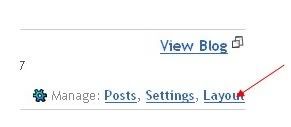
2.Next,click the edit html tab as shown in the below picture.

3.Add the below html code as specified in the below picture.
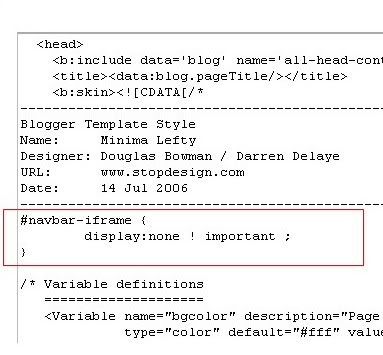
4. Save the changes.
Now, you can see your blog without that navbar(this tip can only hides the navbar,it doesn't completely delete it).If you want the navbar to appear again,just remove that code and save the changes.
If you have any doubts,regarding this post,don't hesitate to ask.You can ask your doubts via comments to this post.
from bloggertricks.com
First,let us see what blogger navbar is:
Blogger navbar allows users to easily navigate to other random blogs and it also has a feauture to search the blogs ,and mark any blog as spam.
So,now you have a clear idea of what really a blogger navbar is.So, why so many people prefer to just remove the navbar inspite of the feautures it has like search,etc.Many people think that, it spoils the look of the blog,especially if your blog has differnet subtitle layout which looks too obvious to see for a visitor.Well, let me come to the actual point on how to disable or hide your blogger navbar.
Below is the step-by-step procedure on how to do it with photos to make it easy to understand.
1.Sign in to your blogger account and click the layout button next to your blog name
2.Next,click the edit html tab as shown in the below picture.
3.Add the below html code as specified in the below picture.
#navbar {
      height: 0px;
      visibility: hidden;
      display: none;
}
4. Save the changes.
Now, you can see your blog without that navbar(this tip can only hides the navbar,it doesn't completely delete it).If you want the navbar to appear again,just remove that code and save the changes.
If you have any doubts,regarding this post,don't hesitate to ask.You can ask your doubts via comments to this post.
from bloggertricks.com
Submit blog to blog directories and increase the traffic
This post explains how to increase your blog traffic by submitting your blog to different kinds of blog directories which rates,provide statistics about your blog and provide free traffic and maximum exposure to your blog.
Submitting your blog to these directories is a very good thing to do particularly if your blog is very new one with low traffic.
These blog directories have high pageranks than your blog(since your blog is a new one with pagerank Zero).So, if someone searches for a particular keyword,there is more possibility for the blog directory to appear in the results than yours.So,by adding your blog to these directories,the visitors enters these directories containing your articles(when they click the article,they enter your site) and also your blog posts will be indexed little faster.So,submitting your blog to these directories will gain you more traffic.
(If your blog is a new one,then put a visitors tracker button in your blog,sothat you will see how many visitors are coming from these directories,from search engines,visitors geolocation,etc).
Here are a few popular visitor tracker websites:
1.Histats(histats.com)
2.Sitemeter(sitemeter.com)
3.Statcounter(Statcounter.com)
So,let me come to the main topic...
Before submitting your blog to these blog directories,my personal suggestion is to create a new email address for this purpose so,your personal emails can't flooded with the emails from the blog directories administrators,etc.)Creating an email is free lol....creat one.
Many of these directories asks you to register before submitting blogs.
There are so many hundreds of blog directories,here is the list of very good popular directories which will send you maximum traffic.
LIST OF POPULAR BLOG DIRECTORIES:
Technorati:Technorati is the largest blog(weblog) directory currently tracking more than 112.8 million blogs.Join technorati and verify your authorship,then you will be provided with detailed statistics regarding your blog,how many blogs are linking to your blog,(they call it 'authority').It is one of the best blog directory and will send tons of triffic if your blog is regularly updated.

Topblogarea:This is another big blog directory which rates and rank the blogs interms of Unique visitors your blog gets.They start the counting from Zero every week, so that even newly submitted blog can have the chance to rank higher in the list.
 Topblogging.com:This is another source of weblogs which also rank the blogs according to the unique hits they get.Nice blog resource,bring you lots of traffic to your blog.
 Blogtoplist:Same here,they rank according to the unique hits you get.But,there is a little change, they will give you to place a voting button in your blog.If any visitor votes for your site from your blog,that is equal to 100 unique hits,but there is only one chance per visitor(one IP address) a day.

Fuelmyblog:This is a cool weblog resource which is different from the ones we discussed so far.You can vote to other blogs and others vote to you.They will keep the top six blogs(voted the most) on the homepage.You can join their forums, read other blogs content,joining in the compitetions and win prizes,etc.

MyBloggingarea:This is a very good weblog directory which ranks the blogs accoring to the unique visitors they get,brought me so much traffic to my celebrity blog than all the other blog directories.I recommend this.

BlogCatalog:It is another good blogging resource,you can promote your blog here for FREE,find other blogs related to yours,etc.They have a special formula to rank the blogs,the more visitors,hits,comments,neighbourhood you get the more your rank will be.Another recommended one.You can join their forums,discussion board,groups,etc with other bloggers and share your thoughts.

BloggingFusion:It is a new one and not a very big one(around 950 blogs) at this time.But,it is a good one and doing pretty well.You can increase your blog exposure, worth a link to it.

Bloghop:You can find blogs related to your blog topic here.Have a nice tracking button and currently having more than 29,000 blogs.

Blogarama:Cool weblog directory currently having more than 69,000 blogs.It will list the blogs in terms of the score your blog have.The score depends on so many things like incoming traffic,outgoing traffic,user ratings,etc. and if you send more traffic to they,they will list your blog in the top 100 blogs.

Topbloglists:Another blog directory which will rank your blog according to the unique hits your blog will get.

Myblogdirectory:This doesn't list blogs interms of any visitors,etc. All blogs are listed randomly so,every blog get the same exposure.If you sent more traffic from your blog to them,your blog will be choosen as a BLOG OF THE DAY which will be placed on the homepage and your blog will recieve the whole traffic their site gets on that day.

Blogroll.net:Another blog resouce which rank accorking to the votes and unique hits your blog get.

from bloggertricks.com
Submitting your blog to these directories is a very good thing to do particularly if your blog is very new one with low traffic.
These blog directories have high pageranks than your blog(since your blog is a new one with pagerank Zero).So, if someone searches for a particular keyword,there is more possibility for the blog directory to appear in the results than yours.So,by adding your blog to these directories,the visitors enters these directories containing your articles(when they click the article,they enter your site) and also your blog posts will be indexed little faster.So,submitting your blog to these directories will gain you more traffic.
(If your blog is a new one,then put a visitors tracker button in your blog,sothat you will see how many visitors are coming from these directories,from search engines,visitors geolocation,etc).
Here are a few popular visitor tracker websites:
1.Histats(histats.com)
2.Sitemeter(sitemeter.com)
3.Statcounter(Statcounter.com)
So,let me come to the main topic...
Before submitting your blog to these blog directories,my personal suggestion is to create a new email address for this purpose so,your personal emails can't flooded with the emails from the blog directories administrators,etc.)Creating an email is free lol....creat one.
Many of these directories asks you to register before submitting blogs.
There are so many hundreds of blog directories,here is the list of very good popular directories which will send you maximum traffic.
LIST OF POPULAR BLOG DIRECTORIES:
Technorati:Technorati is the largest blog(weblog) directory currently tracking more than 112.8 million blogs.Join technorati and verify your authorship,then you will be provided with detailed statistics regarding your blog,how many blogs are linking to your blog,(they call it 'authority').It is one of the best blog directory and will send tons of triffic if your blog is regularly updated.
Topblogarea:This is another big blog directory which rates and rank the blogs interms of Unique visitors your blog gets.They start the counting from Zero every week, so that even newly submitted blog can have the chance to rank higher in the list.
Topblogging.com:This is another source of weblogs which also rank the blogs according to the unique hits they get.Nice blog resource,bring you lots of traffic to your blog. Blogtoplist:Same here,they rank according to the unique hits you get.But,there is a little change, they will give you to place a voting button in your blog.If any visitor votes for your site from your blog,that is equal to 100 unique hits,but there is only one chance per visitor(one IP address) a day.Fuelmyblog:This is a cool weblog resource which is different from the ones we discussed so far.You can vote to other blogs and others vote to you.They will keep the top six blogs(voted the most) on the homepage.You can join their forums, read other blogs content,joining in the compitetions and win prizes,etc.
MyBloggingarea:This is a very good weblog directory which ranks the blogs accoring to the unique visitors they get,brought me so much traffic to my celebrity blog than all the other blog directories.I recommend this.
BlogCatalog:It is another good blogging resource,you can promote your blog here for FREE,find other blogs related to yours,etc.They have a special formula to rank the blogs,the more visitors,hits,comments,neighbourhood you get the more your rank will be.Another recommended one.You can join their forums,discussion board,groups,etc with other bloggers and share your thoughts.
BloggingFusion:It is a new one and not a very big one(around 950 blogs) at this time.But,it is a good one and doing pretty well.You can increase your blog exposure, worth a link to it.
Bloghop:You can find blogs related to your blog topic here.Have a nice tracking button and currently having more than 29,000 blogs.
Blogarama:Cool weblog directory currently having more than 69,000 blogs.It will list the blogs in terms of the score your blog have.The score depends on so many things like incoming traffic,outgoing traffic,user ratings,etc. and if you send more traffic to they,they will list your blog in the top 100 blogs.
Topbloglists:Another blog directory which will rank your blog according to the unique hits your blog will get.

Myblogdirectory:This doesn't list blogs interms of any visitors,etc. All blogs are listed randomly so,every blog get the same exposure.If you sent more traffic from your blog to them,your blog will be choosen as a BLOG OF THE DAY which will be placed on the homepage and your blog will recieve the whole traffic their site gets on that day.

Blogroll.net:Another blog resouce which rank accorking to the votes and unique hits your blog get.

from bloggertricks.com
Top 5 Ways to get Free One Way Backlinks to your site
One way backlinks are very critical to any website success. The more one way backlinks pointing to your site, the more your Google Pagerank and the more amount of traffic you will get. This should also increase your sales,etc.
But the thing is.. getting the right and quality one way backlinks from high pagerank sites is not an easy task, and in this article, we'll find out some of the best ways to get free one way backlinks:
1. Try to write as much quality content as you can... that will encourage the readers to link to your site. The more useful, informative content you post, the more likely people are to link it. But, this method can take a while to really pay off because like all the new websites, you don't get much traffic.
2. Write quality articles and submit them to top article directories like ezinearticles and goarticles. The advantage in this is, you'll not only get a backlink from high pagerank directories, but also you'll find that your articles are used on other people's sites with a backlink to your site.
3. Participate in forums,discussion boards that are related to your website's niche and add a link to your site in the signature. Make sure that you write quality posts, don't spam. This will also help you get some decent traffic to your site.
4. There is absolutely nothing wrong to get a backlink from a related blog post you decide to comment on. This is one of the effective way of one way link building especially if you comment often on blogs. Comment on blogs related to your niche with a link back to your site as your signature.. and Again, make sure you never spam.
5. Submit your site link to major, well known web directories. Getting listed in directories related to your site not only bring you tons of targetted traffic, but will also improve your search engine rankings. Some of the popular directories to get listed in are DMOZ directory and Yahoo directory. You can submit your link to both paid and free directories and they worth your time.
by bloggertricks.com
But the thing is.. getting the right and quality one way backlinks from high pagerank sites is not an easy task, and in this article, we'll find out some of the best ways to get free one way backlinks:
1. Try to write as much quality content as you can... that will encourage the readers to link to your site. The more useful, informative content you post, the more likely people are to link it. But, this method can take a while to really pay off because like all the new websites, you don't get much traffic.
2. Write quality articles and submit them to top article directories like ezinearticles and goarticles. The advantage in this is, you'll not only get a backlink from high pagerank directories, but also you'll find that your articles are used on other people's sites with a backlink to your site.
3. Participate in forums,discussion boards that are related to your website's niche and add a link to your site in the signature. Make sure that you write quality posts, don't spam. This will also help you get some decent traffic to your site.
4. There is absolutely nothing wrong to get a backlink from a related blog post you decide to comment on. This is one of the effective way of one way link building especially if you comment often on blogs. Comment on blogs related to your niche with a link back to your site as your signature.. and Again, make sure you never spam.
5. Submit your site link to major, well known web directories. Getting listed in directories related to your site not only bring you tons of targetted traffic, but will also improve your search engine rankings. Some of the popular directories to get listed in are DMOZ directory and Yahoo directory. You can submit your link to both paid and free directories and they worth your time.
by bloggertricks.com
Subscribe to:
Comments (Atom)